Showing posts with label cables. Show all posts

Sunday, 20 November 2011

What Are HDMI Cables?

What Are HDMI Cables?

Hdmi

First things first, what does HDMI mean? HDMI is an acronym for high definition multimedia interface. With recent advances in technology, high definition multimedia has become increasingly popular; it provides the best audio-visual (AV) output.

HDMI cables link together various digital mediums, such as TV and DVD player. In contrast to previous AV connectors, HDMI cables mean that we need fewer to link various Medias together, but there are other advantages too, here we will explain the basics of HDMI.

High definition is taking off in a big way; most TVs, sound systems, laptops, etc, now come with HDMI ports/sockets, and such ports are fast becoming the standard fixture. The HDMI cable and sockets are now replacing the SCART lead as media connections. HDMI connection allows both visual and audio information to travel along a single lead, thus the reason for fewer wires. SCART uses an analogue signal to transfer information, while HDMI uses a digital signal.

Digital signals are much more advantageous than analogue signals, for various reasons, including, less degradation of information (meaning cleaner images and higher quality sound), flexibility, reliability (signals are less open to corruption and 'noise'), ease of integration with other digital networks, and digital signals are less expensive to produce and communicate. Generally, by using HDMI connections, the whole process of linking together various media players, becomes a lot simpler and easier to achieve, and with fewer potential problems.

High definition multimedia has transformed our viewing pleasure, enabling clearer, crisper visual and audio quality. There is much less likelihood of distorted imagery or sound when using HDMI cables; here are some of the main advantages of HD multimedia interfacing, over the more traditional interfaces:

Audio and visual experience is enhanced, past problems, such as ghosting, have been all but eliminated.

Because fewer wires are needed, the process of connecting various devices has been simplified immensely. This means that fewer mistakes can be made, and are easily rectified when they arise, but also, that the cost of interfacing has been greatly reduced, as there are fewer purchases involved - a single cable, as opposed to multiple cables.

HDMI supports high definition, clearly, but it can also deal with standard signals too, meaning it is not necessary to upgrade all your media devices at once to make use of the HD interfacing system. Moreover, the technology has been created in such a fashion that it will be able to support media types that have yet to be developed.

It is the standard interface system used by the majority of media industry leaders, from systems manufacturers, such as Toshiba, Panasonic, and Sony, but also from the producers of film and media, such as Fox, Disney, and Universal.

Surf Wall Decal Fresh Salsa Recipe Food Processor canon tripod

Saturday, 5 November 2011

If Your HDMI Cables Are Too Short, What Can You Do?

If Your HDMI Cables Are Too Short, What Can You Do?

Hdmi

A pretty common problem that comes with the advent of HDMI (High Definition Multimedia Interface) becoming the new industry standard for transmitting TV signals is how to select the correct length HDMI lead. In the old days when everything was carried by RG6 Coaxial cable, it was possible to run the signal over pretty long runs and then simply cut the cable to length and fit a coax connector and simply connect it to the TV. Although RG6 cable is still used to connect the satellite dish to say for example a Freesat+ receiver, the output from the box to the TV will now invariably be a HDMI cable.

Another complicating factor is the popularity of hanging Flat screen TVs on a bare walls or over a fireplace. Obviously nobody wants HDMI cables tacked along the wall, so invariably the cables are being buried in the wall and normally run from the TV to a nearby built in unit which will house the satellite receiver. What makes selecting the correct length of lead is that it is not possible to simply extend or shorten the lead. In general there is a good selection of HDMI cables ranging from 1m all the way up to 20m, with the upper limit being due to the level of signal loss that occurs in cables that are no longer than 20m.

No matter how well you plan it there is always a possibility the the cable will too short. For example the HDMI input on your new HD TV is in a different location than you expected, or you decide to mount the TV in a slightly different location. There are 2 options when it comes to extending a HDMI cable.

The first and simplest option is to simply use a HDMI coupler which comes with sockets on both ends into which to insert HDMI cables. This option is both inexpensive, compact and does not need a power supply. It is however only suitable to use when the combined length of the 2 cables is less than 20m.

The other option is to use a HDMI repeater, which is a powered unit that both joins 2 HDMI cables together and also boosts the signal. Normally this unit is used when combining HDMI leads where the combined length is over 20m. The need to have the unit plugged in and its cost are certainly issues, but this is an essential unit on very long runs.

A final note on HDMI cables is that in general over short runs, the difference in the signal loss between a low cost and an expensive HDMI is pretty minimal. Where spending the extra money is worth while is on long runs of cable. Most of the cost lost HDMI supplier don't do budget level cables that are longer than 5 or 10m.

wmf pressure cooker parts

Wednesday, 5 October 2011

HDMI TV Cables - Always Do the Research Before You Buy

HDMI TV Cables - Always Do the Research Before You Buy

Hdmi

As the technology of HDTV continues to become more complex, consumers need to educate yourself on some products is to ensure the right fit for them. There are tons of information there, the possibility of pros and cons of HDTV, but the most important feature is if you have a HDMI cable and a DVI port. The reason is the connection of these two slots are what is needed to make the most of the HDTV experience. So, with HDTV, you can use the cable, blue dvdPlayer, home theater, and even the computer.

I know many of you are still using the standard component video cables, which were used with analog models. You may also find that this slot connection component consists of a red, green and blue slot, audio and video signals through the transmission of your home entertainment. With an HDMI, you continue to use a single cable to deliver audio and video signals transmitted through the digital HDTV components.

Many of youI can say is that the component video cable is already some time ago, and are cheaper HDMI ports. This is a true statement, but there are fewer brands available to suit every family. In addition, analog video component cable and built for analog TV. So, with these cables, will not have the same advantage of a digital experience like you would with a single HDMI cable. That said, it only makes sense to use the correct cable for HDTVcomponents.

For consumers that are interested in using their HDTVs as a monitor for their computer, a DVI cable is needed. DVI, much like a HDMI connection, is digital but lacks the ability to carry audio signals. So an extra component cable is needed to transfer sound from your computer.

Now if you want top of the line in video and audio cables to broaden your digital components, HMDI cables are superior. What makes them so superior is it only takes one cable to transfer video and audio digital signals. So this means that you have less of a hassle trying to figure out where to connect these cables and a reduction in cable clutter.

So now that you know the reason you should use HDMI connectors for your digital component, your next step are to do some research to determine which cables are for you. There are many expensive models out there but there are also lesser models that will give your digital components the same effect. Just remember when you finally make that purchase; there is no difference in the video and audio signals when you're comparing higher priced cables versus lower priced ones. As long as your HDMI tv cables are verified, you will achieve the ultimate digital experience with your HDTV components.

kids inflatable pools littlest pet shop messenger bag

Monday, 3 October 2011

HDMI Cables - Running the HDMI cable to your cable box

HDMI Cables - Running the HDMI cable to your cable box

Hdmi

There are some things to consider when you run an HDMI-to-box cable into your home. Many cable providers these days you will have a high definition receiver with HDMI port on the offer back. Of course, you must subscribe to HD package through your cable provider first. Next you need to buy the HDMI cable.

The first thing to consider when you connect the HDMI cable, the length between the receiver and the TV. Many peopleas all its components in a room or closet and put the wires through the wall. This will give you a sleek and clean. However, you must use a receiver for remote controls.

During the run HDMI cables through the wall, it is recommended that you get a cable that is CL2 rated for in wall installations. This will ensure that do not pass the risk of fire and electric controls allow you to configure, if necessary.

The next thing toto verify the thickness of the HDMI cable. Most HDMI cables shows the thickness of the cable to American Wire Gauge (AWG). The lower the AWG number, the thickness of the cable. We recommend using a 22 or 24 AWG for longer runs, because you can lose the HDMI signal through a thin cable. 28AWG HDMI cable works fine with lengths of 15 feet and under.

It 'also important to check the price for the HDMI cable before your cable box. If youthe feeling that the HDMI cable to do is look too expensive, it probably is. Cheap HDMI cables are available at a very low price, and will not make any difference in image quality. All that matters is whether the signal arrives. Many people are for the brand of HDMI cable to pay, not the cord itself.

You should now have a better understanding of how to run the HDMI receiver. I hope you enjoy your TV shows in high definition!

lucite bath accessories toddler leash backpack

Thursday, 25 August 2011

What is the difference between component and HDMI cables?

What is the difference between component and HDMI cables?

Hdmi

On a short length, not the cable makes no difference. What is different is that in the case of component cables to convert the TV signal to analog component to digital. In the case of HDMI cable, the signal is already digital. So it could be a big difference if your TV does not convert well.

Image quality aside, the reason why we recommend using the HDMI cable carries the signals is that HDCP is not component. If the source device, such as aCable box, looking for the HDCP handshake, and do not get it, it will output an HD signal. So if you want to watch HBO in HD from a cable box, you must use HDMI or DVI.

I use component cables. Then again, I was above $ 60 on it (gold plated, great conductors, often shielding, etc.) for both component video and audio channels. And, I bought a few years earlier were still in the HDMI cable. The difference in performance between the top-end component video cableand an HDMI cable is negligent. But if only standard RCA cables - as the company offers cheap cable TV for you - are not as good as the HDMI cable.

How the HDMI cable connections spread more and more, we are often asked: What is better HDMI or component video? The answer, as it happens, it will not cut and dried.

First, a note: everything is said here, as it appears for DVI-HDMI, DVI for consumer electronics devices less and less of alltime, not so often asked, but DVI and HDMI are essentially the same story, the image quality-wise. The main differences are that HDMI carries audio and video, and uses a different type of connector, but both have the same encoding scheme, which is why a source to a DVI to HDMI monitor, or can be connected and vice versa, with a cable DVI / HDMI cable, with no intervening converter.

The conclusion of this article - if you are not inclined to read all the details - iswhich is very difficult to predict whether an HDMI connection is better or worse image of an analog component video to connect. It will often be significant differences between digital and analog signals, but the differences are not part of the connection type and instead depend on the characteristics of the source (eg DVD player) and the display device (such as the TV). Why this is so, however, takes the discussion a little 'more.

Several peopleDay looking for a solution trying to HDMI interconnect to the outputs of the component via a connection cable for their high-definition equipment. Unfortunately, this is not a matter of reorganizing the right kind of cables and plugs. It 'a problem of incompatibility of basic analog and digital transmission similar to the upcoming digital TV to receive over the passage of rabbit ears for your current analog broadcasting signals. They are not compatible and can only confuse peoplelike the poor guy in the commercial register.

Component video is analog format. With analog signals, the signal voltage on the cable in wave format and how changes in wave height, what is important. Theoretically, there is an infinite number of values ​​between zero and maximum, variable wipers I had something like on an old Thunderbird. With HDMI or DVI format, these are based on digital signaling. Digitally as you have probably heard, uses ones and zeroswith a series of pulses all at the same height, and are present or absent. At the other end of the new set of information processing systems. Mounted on a 4-bit binary encoding can be one of 16 different values ​​of 4 1 and 0 as the group can have 16 different combinations. Equipment only at the end of the cable, the signal acquisition and is looking for analog waveforms would put out a total nonsense when he received pulses of 1 and 0

Some solutions are verysimple. When an HDMI or DVI on both boxes, use them. The difference between DVI and HDMI is that HDMI caries in addition to audio and video signals. But DVI is just as good and other than the cost of an additional audio cable, that will solve the problem. If you try to use the component outputs, because it is already linked to the HDMI connection, HDMI switch box that they are fairly cheap, where there are multiple HDMI cables on one side with a pin can outputother.

Components via a power analog signal is transmitted. HDMI is digital. Among other things, this has the following advantages: As long as the data is successfully transferred the perfect image of the incoming data into your TV. It is not a single pixel in the difference that erases the device 'submit' and what the TV will be reached. Component signals (such as all analog signals) may be of varying quality, and you can get interference.

So basically: At first glance, might seem the HDMI cablemore expensive than component cables, but it is not right. For the quality of the HDMI cable is requiered to the length you need together. If you have only a short distance (two or three meters) to cover a cheap cable offers the best possible result that can be achieved by any means ... is digital ... the cheap cable does not affect the image quality ... exactly as you use the Ethernet cable from your computer to connect to inet has no influence on image qualityVideo download / stream.

Of course this does not mean bad part: In favor of analog video connections is probably by far the best, but only HDMI has the advantage of not having to worry about the signal accidentally "touched" by external influences during the transfer. So if you can: HDMI is the best choice.

Laptop Backpack Wenger

Monday, 22 August 2011

Types of HDMI cables

Types of HDMI cables

Hdmi

If you intend to buy an HDMI cable, then it is time that we should look deeper into this technology. High-Definition Multimedia Interface is a new technology that has revolutionized the entertainment industry. You should be aware of this technology before any purchase. The good thing is that you can easily find information on the Internet with detailed information on the technology.

There are four types of cables that can carry theseTechnology. All these cables are used in the entertainment console, Blu-ray Disc and other devices that use digital signals. You can buy any type of HDMI cable, but you should first check the real needs as any mistake can cost money and purchase wasting your time and being as you are for replacement or refund to go.

The first type is called a Type-A is the most popular and most commonly in use. This type of cable uses a standard 19-pin and is available in standardPlug size and format. This type of cable is most commonly used and is perfect for all types of electronic devices and entertainment console.

The second type of cable is known as type B and is used mainly in film and television industry. This type of cable used in place of 19 and 29-pin has a smaller size. It 's perfect for use in the entertainment industry, where other types of equipment and devices used and are technical directors and employees want more flexibility.

The third type ofThe cable is referred to as type C and uses HDMI 1.3 specification. They also use 19 pin plug but smaller. Can be used with portable devices and do not hold much water for use with the entertainment console standards.

Fourth type, also known as Type D uses 19 pins and has smaller connectors and standard size. However, it can be used with standard electronic devices and it works very well with all types of entertainment console.

All four types of cables are suitable for various types ofConsole and can not be exchanged. Type A is the most common form and is used regularly in homes and in the corporate sector. Film and television companies are more comfortable with the units of Type B and Type C and Type D at home, but can be used with portable appliances; D can also be used for standard devices.

Helmet Cameras Reviews buy men s luxury watch

Saturday, 13 August 2011

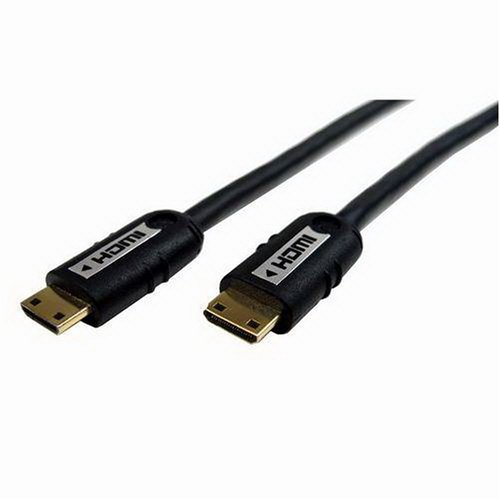
Cables Unlimited PCM-2294-02M Mini-HDMI Cable (2 Meters, Black)


Cables Unlimited PCM-2294-02M Mini-HDMI Cable (2 Meters, Black)


Rate This Product :


Cables Unlimited PCM-2294-02M Mini-HDMI Cable (2 Meters, Black)

Cables Unlimited PCM-2294-02M Mini-HDMI Cable (2 Meters, Black)
Cables Unlimited Mini-HDMI to Mini-HDMI cables provide an ideal way to effortlessly connect Digital Cameras, Camcorders, and other digital devices to an HDTV with a mini-HDMI connector. These cables are HDMI 1.3 compliant, guaranteeing optimum video and multiple channel audio signals. Gold-plated connectors ensure the ultimate in error-free signal transfer

Cables Unlimited PCM-2294-02M Mini-HDMI Cable (2 Meters, Black)

  • HDMI 1.3 compliant
  • Connects a mini HDMI-equipped component with a mini HDMI-equipped display device
  • Supports resolutions up to 1080p and 8-channel surround sound
  • Lifetime warranty
  • 2-meter length

Cables Unlimited PCM-2294-02M Mini-HDMI Cable (2 Meters, Black)
Cables Unlimited Mini-HDMI to Mini-HDMI Cables provide an ideal way to effortlessly connect digital cameras, camcorders, and other digital devices to an HDTV with a mini-HDMI connector. These cables are HDMI 1.3 compliant, guaranteeing optimum video and multiple channel audio signals. Gold-plated connectors ensure the ultimate in error-free signal transfer.
Cables Unlimited PCM-2294-02M Mini-HDMI Cable (2 Meters, Black)

Available at Amazon : Check Price Now!


Cables Unlimited PCM-2294-02M Mini-HDMI Cable (2 Meters, Black)
*** Product Information and Prices Stored: Aug 13, 2011 23:22:54 ***

buy swiss luxury watch oversized patio umbrella recliner sofa slipcover

Thursday, 11 August 2011

HDMI cables provide the best transmission

HDMI cables provide the best transmission

Hdmi

In this age of instant communication and information are intended to be surrounded by a bundle of wires. Although most of the gadgets we use today are increasingly wireless, and now everything is just a click away from us, the wires are still an integral part of our lives. Previously you had to go through several layers of information before it reaches us, but not so nowadays. Wires do it for us. We receive video transmission, audio signals, data, and each bitInformation of any electronic device on these wires. Every aspect of our lives, be it medical, financial, educational and social also suspended the operation of these wires.

The quality of this cable has been improved with technological advances. We have always returned better transmission quality of data of any kind with respect to a few years ago. This was possible only through constant research and changes in the quality of these lines. HDMI cables are the first and onlyall uncompressed digital video / audio interfaces. HDMI supports high-definition video and multichannel audio on a single cable. There is also the cost, complexity and eliminates the confusion of multiple cables because of its cable system. It has many features updated means of transmission, such as higher speeds, deep color and lip sync. All major consumer electronics manufacturers are supporting these cables. Wire World is the leading manufacturer of HDMI and other cables and it has carveda niche for himself in a very short time.

Speaker cable connects a speaker and an audio amplifier. A good speaker cable offers features such as resistance, capacitance and inductance to determine their performance. The wire should be based on the quality of the purposes of production, price, comfort and aesthetics. You can have a great sound system, but the wires do not get up, you can experience high quality sound we all crave after the ruin. Thoughone has good quality speakers, is of no relevance to the poor quality of cables. You have to be careful about the properties of these cables may like length, thickness and suitability as these or the failure of a system.

No matter how you wire the cradle on the cross in our lounge or our desktop, we can not deny that the tubes are here to stay for some time. What can improve our lives, choosing the appropriate cable, you can go a long way in the realization of the truePotential of the various electronic gadgets.

graco snug ride infant car seat Minnie Mouse Bike Helmet buy swiss watches luxury

Saturday, 16 July 2011

Difference in quality between generic and Monster HDMI cables HDMI cables

There is a difference in image quality between the expensive HDMI cables for $ 99.00 retail electronic and generic brand HDMI cables, which can buy almost stuck with the change between the sofa cushions? To find out, is all, what we have to see what a HDMI cable. HDMI is a digital signaling protocol used for both audio and video signals, ie between the HDMI source (cable, satellite box, Blu-ray, etc.) and broadcast television, there is only one digitalSignal.

Digital signals provide information about the tracks. This means that the TV is only a matter of when it receives a response signal: It 'a 1 or 0? It 'really is that simple! With digital cable, whether or not the signal. There is no "in between" - without signal degradation that can occur with analog signals. If there is an electromagnetic interference or radio interference, it is highly unlikely that the TV for a 0, 1 or 0-1 for an error. If youconcerned about EMI and RFI interference, you can use a low-AWG cable. The lower the AWG number, the thickness of the cable. AWG cables are ideal for low wall installations and long cables.

Hdmi

Trademark or not, there are HDMI cable gives you the same results. As long as the cable meets the HDMI, it is good to go. From now on, to go with the cheaper generic brand cable to prevent burning along in your wallet!

Difference in quality between generic and Monster HDMI cables HDMI cables

automated cat litter box uco ice cream maker

Friday, 1 July 2011

Cables To Go Pro Series HDMI CL2 Cable - Video / audio cable - HDMI - 24 AWG - 19 pin HDMI (M) - 19 pin HDMI (M) - 25 ft - shielded - black


Cables To Go Pro Series HDMI CL2 Cable - Video / audio cable - HDMI - 24 AWG - 19 pin HDMI (M) - 19 pin HDMI (M) - 25 ft - shielded - black


Rate This Product :


Cables To Go Pro Series HDMI CL2 Cable - Video / audio cable - HDMI - 24 AWG - 19 pin HDMI (M) - 19 pin HDMI (M) - 25 ft - shielded - black

Cables To Go Pro Series HDMI CL2 Cable - Video / audio cable - HDMI - 24 AWG - 19 pin HDMI (M) - 19 pin HDMI (M) - 25 ft - shielded - black
The new Pro Series commercial grade CL2 cables offer true digital performance while meeting the highest standards in building code requirements for in-wall installations. Available for HDMI(R), DVI and DVI+3.5mm audio signals, these cables can meet the demands of virtually any commercial installation.By supporting resolutions of 1080p for displays and up to 1920 x 1200 pixels for computers, and with lengths ranging from 6 to 50 feet, the Pro Series is the ideal connectivity solution for A/V equipment used in classrooms or conference rooms. 24k gold-plated connectors prevent metal corrosion, resulting in the optimal signal transfer for the highest picture and sound quality. Shielded 24AWG copper conductors protect against EMI and RFI to ensure uninterrupted performance. High quality materials and construction, along with rigorous factory testing and a full lifetime warranty, guarantee long-term, dependable performance. Connector 1: HDMI MaleConnector 2: HDMI Male*CL2 is equivalent to FT4 rating in Canada, while CMP is equivalent to FT6.Please Note: HDMI, the HDMI logo and High-Definition Multimedia Interface are trademarks or registered trademarks of HDMI Licensing LLC.
Cables To Go Pro Series HDMI CL2 Cable - Video / audio cable - HDMI - 24 AWG - 19 pin HDMI (M) - 19 pin HDMI (M) - 25 ft - shielded - black

Available at Amazon : Check Price Now!


*** Product Information and Prices Stored: Jul 01, 2011 10:48:24 ***

Please Check Update Here!!

outdoor living bbq tabletop photo studio

Monday, 30 May 2011

Different types of HDMI cables

Why do you need HDMI cable?

If you just email your friend a funny video and you want the video in full glory, rather than watching on a small computer or laptop, then you would have to 'hook your computer to your plasma or LCD TV and want to look at big screen. There are different types of cables and connectors with which it can depend on your computer and your TV model, and the HDMI cable is one of them. You HDMI cableConnect your computers, game consoles, monitors, PlayStation, Xbox, or camcorder to a TV or a digital video projector. What is the cable, it transmits uncompressed digital data, with a little 'different standards - the use of HDMI 1.0 and HDMI 1.2a standard video cable EIA/CEA-861-B, use the HDMI 1.3 + CEA-861-D one.

Hdmi

At the time of this writing, there are different types of HDMI cables and the right choice for your application a little 'complicated and could getconfusion. If you want to get down and substantially lower in the details, you are probably better off going to the electronics store next and explain your situation, or online and order after the cable know what you need. HDMI cables are commonly used:

HDMI up to 1080i and 720p HDMI, Ethernet HDMI high-speed High-Speed ​​HDMI, Ethernet Automotive HDMI

1080i refers to the high-definition videoFormat the 1080p progressive scan mode is different, and typically uses 1920 x 1080 pixel resolution and 16:9 aspect ratio. On the other hand, 720p is a resolution of 1280 × 720 progressive scan video format.

There are a number of other HDMI cable, ie, platinum or gold, where the HDMI cable connections are different chrome. However, you can use any of these interchangeable because there is virtually no difference between the two. The coatingConnections could make a difference in how sensitive they are oxidizing agents, but since you probably do not open and use these lines will probably not be, can in the coming years, you buy either one and get the same results . HDMI cables are relatively cheap and as long as the right way, that will give you excellent video and audio quality, which can be enjoyed on a big screen TV or projector.

Different types of HDMI cables

cheapest rc helicopter mirro matic pressure cooker parts

Saturday, 28 May 2011

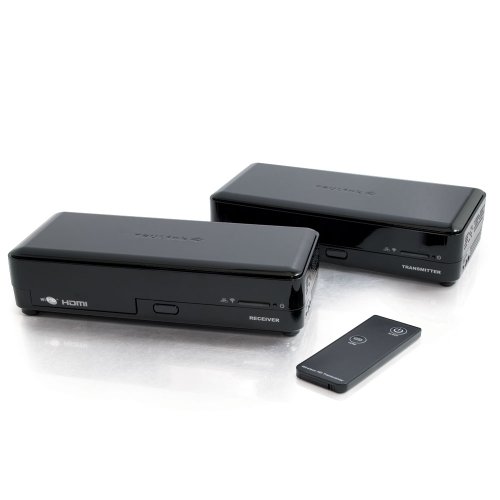
Cables To Go 29670 TruLink 1-Port 60 GHz WirelessHD Video Transmitter and Receiver Kit (Black)

Cables To Go 29670 TruLink 1-Port 60 GHz WirelessHD Video Transmitter and Receiver Kit (Black) Review


Cables To Go 29670 TruLink 1-Port 60 GHz WirelessHD Video Transmitter and Receiver Kit (Black) Feature

  • WirelessHD 1.0 certified; Meets Digital Transmission Content Protection (DTCP) protocol
  • Compatible with other WiHD-enabled consumer electronics bearing the WiHD logo
  • HDMI 1.3 compatible; 36 antenna array provides a strong wireless signal
  • Data transfer rates up to 4 Gbps
  • Supports true uncompressed 1080p @ 60 GHz resolution and 7.1 channel surround sound

Cables To Go 29670 TruLink 1-Port 60 GHz WirelessHD Video Transmitter and Receiver Kit (Black) Overview

The TruLink 1-Port 60 GHz WirelessHD Kit enables high definition wireless transmission between your television and your HDMI components. Enjoy the full HD 1080p signal from your computer, Blu-ray™ player, set-top box, gaming console or other HDMI device to your HDMI-enabled television. The 60 GHz transmission capability means greater flexibility in your home theater setup by allowing you to place the in-room components up to 33 feet (10 meters) apart (longer distances may be supported depending upon the environment). This complete kit (which includes the wireless transmitter and wireless receiver) is ideal for situations where in-wall cabling is either not feasible (such as in plaster, brick or exterior walls) or not desired (such as in apartments or other rental properties). By offering true uncompressed audio/video transmission, the TruLink WirelessHD kit is a quick, convenient and reliable cable replacement. This plug-and-play solution requires no software, no drivers and no setup - simply connect the receiver with the HDMI component and instantly transmit content to your television. Convenient and reliable high performance! With its plug-and-play setup, this solution requires no drivers or software. The auto power function automatically turns off the attached component when the transimtter is turned off. The transmitter and receiver each have an on/off switch to conserve power when not in use, and both are wall-mountable. Note: Although performance characteristics may exceed stated distance limitations depending upon the environment, we recommend, that per best practices, the transmitter and receiver should face each other within the same room, be located within 33 feet of each other, be placed at the same level (i.e. the transmitter should not be placed higher than the receiver), and be located in open spaces (i.e. not in a cabinet or enclosed shelf).

Available at Amazon


chicken soup pressure cooker

Sunday, 22 May 2011

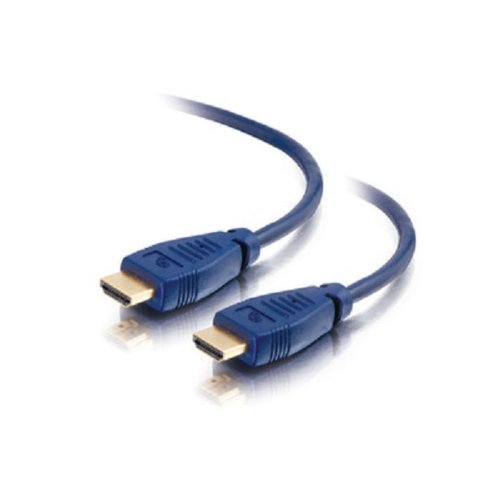
Cables To Go 40565 Velocity High-Speed HDMI Cable (4.9 Feet/1.5 Meter, Blue)

Cables To Go 40565 Velocity High-Speed HDMI Cable (4.9 Feet/1.5 Meter, Blue) Review


Cables To Go 40565 Velocity High-Speed HDMI Cable (4.9 Feet/1.5 Meter, Blue) Feature

  • Connector 1: HDMI Male and Connector 2: HDMI Male
  • 1080p HDMI cable provides digital high-definition audio and video with no signal degradation
  • Fully-shielded conductors provide complete immunity to EMI/RFI interference, and 24-karat gold-plated connectors ensure superior signal transfe
  • HDMI (v1.3 with Deep Color, x.v.Color?, Dolby® True HD, and DTS-HD Master Audio)
  • High bandwidth (340 MHz/10.2 Gbps) for high speed data transfer

Cables To Go 40565 Velocity High-Speed HDMI Cable (4.9 Feet/1.5 Meter, Blue) Overview

The Velocity HDMI cable delivers a strong combination of performance and value, and is a high performance home theater interconnect for high-definition DVD players, HDTV receivers, TV sets, projectors, a/v receivers, and other HDMI-equipped devices. Enjoy high-resolution digital video and true digital audio, delivered together in one convenient, compact connection. High quality materials and construction ensure a lifetime of dependable performance. Fully-shielded conductors provide complete immunity to EMI/RFI interference, and 24-karat gold-plated connectors ensure superior signal transfer. This fully-functional, high-bandwidth cable is tested to perform at industry standards and is backed by a lifetime warranty

Available at Amazon


stainless steel bbq tools

Sunday, 8 May 2011

Get the most out of HDMI cables by using a switching device

Increased demand for high-definition experience home theater completely, so that the number of producers increases compatible with HDMI devices. Today, a modern home theater system from multiple sources, including HD DVD and Blu-ray players, set-top boxes, game consoles are all probably made as standard to offer HDMI interface. This is great for consumers because crystal clear digital picture and sound quality, but with so manyDevices that an HDMI connection, a bit 'of a headache when it comes to link all these devices to a TV.

What exactly is an HDMI Switch?

Hdmi

In short, an HDMI switch, a device that can connect multiple HDMI inputs to one output. Most of the basic switch has two inputs and one output, so you can connect 2 devices would be the TV. The switch you can choose between the device acts as a source, you can connect your DVD wishlistPlayer and Xbox 360, then simply select the button that was displayed on the TV signal. There are many different switch configurations, some with 4, 5 or 6 inputs.

Why would an HDMI Switch?

It is unlikely that the TV has an HDMI input, so if you have a lot of high-definition signal sources, can be a real pain to keep climbing behind the TV to switch cables. With a HDMI switch all the devices of origin arealready connected and you can simply select the signal you want to view. At the touch of a button you can switch from a DVD movie for your favorite multiplayer game on Xbox Live to make a difference with the latest news satellite television channel.

What should I buy an HDMI switch?

One of the most important things you need to think about how many HDMI switch is - 02:01 a switch may be more convenient in the short term and for those who are only 2 perfectHDMI source devices when you connect your entire home theater system via HDMI, then you should really look in a switch with multiple inputs. After all, if your box can not accommodate a large number of devices, so you will still end up having to replace the mess of HDMI cables that do not actually defeat the whole purpose of HDMI switch, in the first place.

What happens if I have HDMI and DVI?

The great thing about HDMI is its compatibility with DVI.Since both formats use the same technology to encode the signal source, you can use an HDMI switch with a device using a DVI signal is generated, just the right adapter cable. This is great news for people who have older devices that only have a DVI port, or for those who must take on hardware in their home theater system. A DVI-HDMI cable is all you need for your device work with a DVI-HDMI switch, as long as you have the correct cable that younot have to worry about compatibility.

Conclusion

HDMI cables are quickly becoming de-facto standard for connection to the world of home entertainment. Not only has the HDMI digital audio and video quality, but together simplifies the entire process of connecting devices. As more and more devices will be compatible with HDMI HDMI switch box, more than ever necessary to ensure that users quickly select the desired input source without resorting to fiddling aroundthe TV trying to disconnect a device to others on their toes

Get the most out of HDMI cables by using a switching device

pork loin pressure cooker recipes

Monday, 2 May 2011

Long HDMI cables - do they work?

As if that were not enough with all the HDMI "stuff" that potential buyers also care about long HDMI cable runs. In the days of analog video, the reliability of signal transmission over long lengths of cable has never been a problem, but in the early days of HDMI and DVI, we heard rumors of consumers experience problems during the relatively short runs, but things have improved over time, but the actual length, you can take a long HDMI cable is always run on another hot potato field.

Let's take a lookHDMI latest specification for an answer to the question. Each cable has been tested by HDMI Authorized testing centers, before they are able to obtain certification of compliance. These certificates can be used as a sort of unofficial guide to practical lengths of cable. There are a number of cables that are compatible with lengths over 10 meters and there are some that have been tested up to 13.0 m, are shown not to degrade the signal for a period determined byAccreditation bodies. A good tip is to buy certified cable with the latest specification is now HDMI 1.3b, 1.3 and 1.3a, but are also acceptable, such as test protocols, these cables have to go through to get the standard is more restrictive than the previous specification, say, 1.1 or 1.2.

Hdmi

Before you are tempted to buy just over 13.0 meters (45 feet), are available and are marketed as compliant, then it may be wise to ask to see a copy of the certificate, becauseCurrently, the length of 13.0 meters (45 feet) is the longest any increase (enhanced) cable that I saw with the proper certification.

That is, there are HDMI cables that are classified as active, the power amplifier to support the use of the signal longer distances possible to use. An EQ unit is also active on this cable, which provides for the loss of high frequency data and then compares these uses. These systems work, but without reliable informationon the actual effective length, the additional costs and the additional option of failure to deliver a signal the inclusion of additional components can be a step too far for your home entertainment system and best left to commercial applications.

But all is not lost if you have to run cable lengths. Just consider the specific HDMI so you can be sure that your system if you build the compatible signal (source) to be connected to a compatible device inthen in turn can be connected to another compatible with the cable and if you pass everything on it will work. As with all specifications, will be built in some flexibility - to construct - and then sent to the signal source for HD-enabled equipment necessary to work better for the equipment, as indicated. This gives you a range of options, the options are not guaranteed by the specifications is not so, as suitable for work in the example above, but the options that have been detectedWork and not for the additional cost of gain.

There are no available ports, while not compatible with a job to do and of course there are the length (for compliance) cable. If you click this, it is important to remember that the higher the bit rate of your HD-capable device uses less chance of success must go. We must also remember that this also applies to long chains, HDTV, home theater, Blu-ray or on the Internet and video streamingrequest to 1080p is to push for longer-range, over a length compatible with its limitations. But for 480p, 720p or 1080i, which can work well. Do you know how lucky it can be.

Now take into account future developments, that if you put these lines in walls, etc. should, if you are the ends of the cable station that you can perform an update. Take where we are today. 1080p is the ultimate solution for HDTV. Not long ago, 480p was the norm,Then came 720p and 1080i, which uses a bit rate almost three times the standard 480p. Then came 1080p, which doubles the bit rate consumption of 1080i and 720p. We are now double on the edge of 3D-TV, 16-bit color, and 1460p level (and higher), 16-bit color only the bit rate required for the current resolution is standard, so you can see where this could go . Another important issue in deciding whether or not long. It 's a fact that the short cables of 2-3 meters(6-10 feet) long, the problems of inferior quality. A cable is a couple of dollars is only as good as they play the tens of dollars, but entering into the realm of not paying attention to questions concerning the quality of much more. In general, the quality of the cable is then lower than the actual distance to work is when the color depth or increase the image resolution.

It can reveal what was said about long HDMI cables and their reliability. For lengths, HDMI compatiblelengths up to 13 meters (45 feet) and their use is virtually guaranteed, even if there are cheaper options for 480p, 720p, 1080i, and - although not always as reliable - 1080p so go ahead and use them with confidence. The same applies to those lengths shorter than 1-3 meters (30-10 feet) in length, although caution should be exercised when using in long signal chains, as might be unreliable. Cheaper options longer HDMI cable work on the limits of itThe capacity can fight in 1460p for the future 16-bit and its use should be questioned if their installation is behind ceilings or walls, as the additional cost of a cable more expensive to less than a complete re-install (not too distant) future. be the use of more compliant HDMI cable length to be mentioned in all the factors mentioned above, but with the driver-related that the best way to see if it will succeed remains in self-insertion of these,The lengths are the cheapest options are to be taken into account when the installation is easily accessible by long HDMI cables and work with the equipment present on OK.

Long HDMI cables - do they work?

pressure cooker distiller magefesa pressure cooker parts gasket pressure cooker